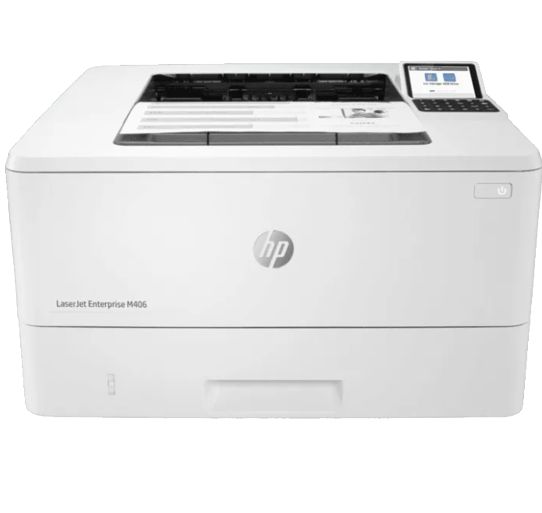
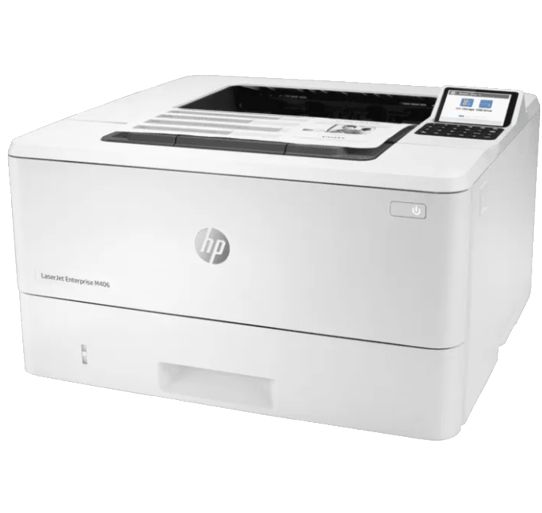
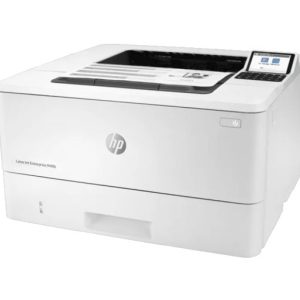
Configure equipes de trabalho para o sucesso sem acrescentar mais nada ao seu trabalho. Ajude as pessoas a lidar com os negócios onde quer que eles aconteçam, proporcionando ao mesmo tempo o controle necessário para toda a frota de TI, usando uma impressora compacta desenvolvida para uso e gerenciamento simples.
O firmware HP FutureSmart pode ser atualizado com os recursos mais recentes para otimizar seu investimento nos próximos anos.
As impressoras HP têm a segurança mais forte do setor porque estão sempre em guarda, interrompendo continuamente as ameaças enquanto se adaptam às novas. E somente as impressoras HP podem se recuperar automaticamente de ataques, portanto, a TI não precisa intervir.
O código operacional (BIOS) é verificado automaticamente durante a inicialização e se repara se estiver comprometido.
Simplifique a colaboração e a produtividade com uma impressora simplificada que suporta a forma como as pessoas trabalham hoje: rápida, ágil e conectada. Imprima textos e gráficos nítidos que sua empresa precisa para ter uma aparência profissional, dia após dia.
Dê aos grupos de trabalho o que eles precisam para ter sucesso com centenas de soluções da HP e de terceiros e suporte para leitores de cartão.
Especificações
Sku
3PZ15A
Print
Colour Output
Black and White
Print Speed, Black
41 – 50
Category
Product Type
Laser Printers
Family Brand
LaserJet
Features
Functions
Print only
Usage
Usage
Enterprise
Perfect For
Enterprise
Connectivity And Communications
Connectivity, Optional
HP Jetdirect LAN Accessory 8FP31A; HP Jetdirect 3100w BLE/NFC/Wireless Accessory 3JN69A
Connectivity, Standard
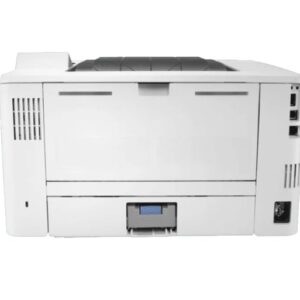
1 Hi-Speed USB 2.0 Host; 1 Hi-Speed USB 2.0 Device; 1 Gigabit Ethernet 10/100/1000T network
Network Capabilities
Yes, via HP Jetdirect Ethernet embedded print server (standard) which supports: 10Base-T, 100Base-Tx, 1000Base-T; 802.3az (EEE) support on Fast Ethernet and Gig Links; IPsec (standard); 802.11a/b/g/n wireless networking (Optional); second Ethernet port (Optional).
Wireless Capability
Optional, enabled with purchase of a wireless hardware accessory. Dual band Wireless Station and Wi-Fi Direct functionality available with HP Jetdirect 3100w BLE/NFC/Wireless Accessory 3JN69A
Mobile Printing Capability
HP ePrint; Apple AirPrint™; NFC touch-to-print (optional); Mopria™ Certified; Wi-Fi® Direct printing; ROAM capable for easy printing; PrinterOn Print
Network Protocols, Supported
Via built-in networking solution: TCP/IP, IPv4, IPv6; Print: TCP-IP port 9100 Direct Mode, LPD, Web Services Printing, IPP 2.0, Apple AirPrint™, HP ePrint; Discovery: SLP, Bonjour, Web Services Discovery; IP Config: IPv4 (BootP, DHCP, AutoIP, Manual), IPv6 (Stateless Link-Local and via Router, Statefull via DHCPv6); Management: SNMPv2/v3, HTTP/HTTPS, Syslog; Security: SNMPv3, SSL Cert Management, IPSec(IKEv1 and IKEv2), Firewall, 802.1x
Printing Media Handling
Finished Output Handling
Sheet feed
Output Capacity
Up to 150 sheets
Maximum Output Capacity (Sheets)
Up to 150 sheets
Media Type And Capacity, Tray 3
Sheets: 550 (optional)
Media Type And Capacity, Tray 1
Sheets: 100; Envelopes: 10
Media Type And Capacity, Tray 2
Sheets: 250
Paper Handling Input, Standard
100-sheet tray 1, 250-sheet input tray 2
Paper Handling Input, Optional
Optional third 550-sheet tray
Input Capacity
Up to 350 sheets (Tray 1: up to 100 sheets; Tray 2: up to 250 sheets)
Paper Handling Output, Standard
150-sheet output bin
Standard Output Capacity (Envelopes)
Up to 10 envelopes
Maximum Input Capacity (Sheets)
Up to 900 sheets (with Optional 550-sheet tray)
Standard Input Capacity (Envelopes)
Up to 10 envelopes
Display Specifications
Display
2.658″ diagonal Color TFT-LCD back-lit (960 (H) x 240 (V))
Display Area (Metric)
54 x 40.5 mm
Environmental
Acoustic Power Note
Configuration tested: base model, simplex printing A4 paper at an average of 38 ipm
AMS: For distribution and use in North America and Latin America only: HP 58A Black Original LaserJet Toner Cartridge (~3,000 pages) CF258A HP 58X High Yield Black Original LaserJet Toner Cartridge (~10,000 pages) CF258X EMEA: For distribution and use in Europe, Middle East, Russia, CIS, and Africa only: HP 59A Black Original LaserJet Toner Cartridge (~3,000 pages) CF259A HP 59X High Yield Black Original LaserJet Toner Cartridge (~10,000 pages) CF259X APJ: For distribution and use only in Asia Pacific – excluding China (PRC) and India: HP 76A Black Original LaserJet Toner Cartridge (~3,000 pages) CF276A HP 76X High Yield Black Original LaserJet Toner Cartridge (~10,000 pages) CF276X
Supplies Feature
HP JetIntelligence Cartridge
Battery And Power
Power
110-volt input voltage: 110 to 127 VAC (+/- 10%), 60 Hz (+/- 3 Hz); 220-volt input voltage: 220 to 240 VAC (+/- 10%), 50/60Hz (+/- 3 Hz) (Not dual voltage, power supply varies by part number with # Option code identifier)
HP recommends that the number of pages per month of imaged output be within the stated range for optimum device performance, based on factors including supplies replacement intervals and device life over an extended warranty period.
Functions
Print
Internal Storage
Not Applicable to this product
Print Languages
HP PCL 6, HP PCL 5, HP PostScript level 3 emulation, native PDF printing (v 1.7), Apple AirPrint™
Paper Trays, Maximum
3
Duty Cycle (Monthly, A4)
Up to 100,000 pages
Paper Trays, Standard
2
Recommended Monthly Page Volume
900 to 4,800 pages
Print Technology
Laser
Duplex Printing
Automatic (default)
Fonts And Typefaces
105 internal TrueType fonts scalable in HP PCL, 92 internal scalable fonts in HP PostScript Level 3 emulation (Euro symbol built-in); 1 internal Unicode Fonts (Andale Mono World Type); 2 Internal Windows Vista 8 Fonts (Calibri, Cambria);additional font solutions available via third-party flash memory cards; HP LaserJet Fonts and IPDS Emulation available at Http://www.hp.com/go/laserjetfonts
Automatic Paper Sensor
No
Printer Management
HP Printer Assistant, HP Web JetAdmin Software, HP JetAdvantage Security Manager, HP SNMP Proxy Agent (Part of HP WebJetAdmin), HP WS Pro Proxy Agent (Part of HP WebJetAdmin), Printer Administrator Resource Kit for HP Universal Print Driver (Driver Configuration Utility – Driver Deployment Utility – Managed Printing Administrator)
Print Colours
No
Top Key Features
Compact Size; Strong Security; Two-sided printing; Energy Efficient; Front-facing USB printing
Target User And Print Volume
For teams up to 10 users; Prints up to 4,000 pages/month
Certification And Compliance
ENERGY STAR® Certified
Yes
Energy Efficiency Compliance
Blue Angel RAL-UZ 205; CECP; ENERGY STAR® certified; EPEAT® Silver
Electromagnetic Emission Standard
CISPR 22:2008 (International) Class A, CISPR 32:2012 (International)/ EN 55032:2012, CISPR 35:2016 (International)/ EN 55035:2017, EN 55024:2010 +A1:2015, EN 61000-3-2:2014, EN 61000-3-3:2013, FCC CFR 47 Part 15 Class A, ICES-003, Issue 6 Class A. Other EMC approvals as required by individual countries.
Safety Approvals And Requirements
IEC 60950-1:2005 +A1:2009 +A2:2013 (International); EN60950-1:2006 +A11:2009 +A1:2010 +A12:2011 +A2:2013 (EU); EN 60825-1:2014/IEC 60825-1:2014 (Class 1 Laser Product); EN 62479:2010/IEC 62479:2010;IEC 62368-1:2014; EN 62368-1:2014; Low Voltage Directive 2014/35/EU with CE Mark (Europe); GS Certificate (Germany, Europe); UL/cUL Listed and UC CoC (US/Canada); CAN/CSA C22.2 No. 60950-1-07 2nd Ed. 2011-12; Compliance with Laser safety standards 21 CFR 1040.10 and 1040.11 except for deviations pursuant to Laser notice No. 50, Dated June 24, 2007; Other safety approvals as required by individual countries.
Environmental
Mercury-free
Blue Angel Compliant
Yes, Blue Angel DE-UZ 205—only ensured when using Original HP supplies
FCC Class A Emissions
FCC Class A emissions – for use in commercial environments, not residential environments
Box Contents
What’s In The Box
HP LaserJet Enterprise M406dn printer; HP Black Original LaserJet Toner Cartridge (~3,000 pages); Getting started Guide; 1 Power cord
Cable Included
No, please purchase USB cable separately
What Is In The Box Footnote Number
[2] For yield information on the cartridge included with your printer, see http://www.hp.com/go/toneryield. Yield values measured in accordance with ISO/IEC 19752 and continuous printing. Actual yields vary considerably based on images printed and other factors.
Warranty
Warranty
One-year, On-site Repair 24-hour / 7 day a week phone support
Memory
Memory Slots
No DIMM slot
Memory Upgrade
Not Applicable to this product
Memory
1 GB
Memory, Maximum
1 GB
Dimensions
Dimensions Without Stand (W X D X H)
381 x 357 x 220 mm
Maximum Dimensions (W X D X H)
381 x 781 x 241 mm (printer fully opened)
Minimum Dimensions (W X D X H)
15 x 14 x 8.7 in
Maximum Dimensions (W X D X H)
15 x 30.8 x 9.5 (printer fully opened)
Weights
Weight
~8.5 kg
Weight Note (Metric)
With Print Cartridges
Geographic
Country Of Origin
Made In Philippines; Made in Japan (#201)
System Components
Control Panel
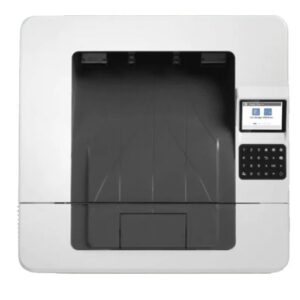
2.7″ Color Non-Touch Control Panel with 24 Keypad
Processors
Processor Speed
800 MHz
Supported Printing Media
Media Sizes Supported
Tray 1: A4, RA4, A5, B5 (JIS), B6 (JIS), 10 x 15 cm, A6, 16K, envelopes (B5, C5 ISO, C6, DL ISO); Custom: 76 x 127 to 216 x 356 mm; Tray 2: A4; RA4; A5; B5 (JIS); B6 (JIS); A6; 16K; 105 x 148 to 216 x 356 mm; Optional Tray 3: A4; RA4; A5; B5 (JIS); B6 (JIS); A6; 16K; 105 x 148 to 216 x 356 mm
Media Size, Tray 3
A4; RA4; A5; B5 (JIS); B6 (JIS); A6; 16K; 105 x 148 to 216 x 356 mm
Media Size, Tray 1
A4; RA4; A5; B5 (JIS); B6 (JIS); 10 x 15 cm; A6; 16K; envelopes (B5, C5 ISO, C6, DL ISO); 76 x 127 to 216 x 356 mm
Media Size, Tray 2
A4; RA4; A5; B5 (JIS); B6 (JIS); A6; 16K; 105 x 148 to 216 x 356 mm
Standard Media Sizes (Duplex)
A4; Oficio (216 x 340 mm); RA4
Media Weight, Supported
Tray 1: 60 to 175 g/m²; tray 2, optional 550-sheet tray 3: 60 to 120 g/m²
Tray 1: 76 x 127 to 216 x 356 mm; Tray 2: 105 x 148 to 216 x 356 mm; Optional Tray: 105 x 148 to 216 x 356 mm
Media Sizes Supported, Key
4 x 6 in; Letter; Legal; Envelopes
Media Sizes Supported, Key
10 x 15 cm; A4; Envelopes
Media Weight, Supported
Tray 1: 16 to 46.6 lb; tray 2, optional 550-sheet tray 3: 16 to 32 lb
Standard Media Sizes (Duplex, Imperial)
Letter; Legal; Oficio (8.5 x 13 in)
Media Sizes Supported
Tray 1: letter, legal, oficio, executive, statement, 4 x 6, 3 x 5, 5 x 7, 5 x 8, postcard (JIS), double postcard (JIS), 8.5 x 13, envelope (commercial No. 9, No. 10, Monarch); Custom: 3 x 5 to 8.5 x 14 in; Tray 2: letter, executive, statement, 5 x 7, 5 x 8, double postcard (JIS); Custom: 4.1 x 5.8 to 8.5 x 14 in; Optional Tray 3: letter, executive, statement, 5 x 7, 5 x 8, double postcard (JIS); Custom: 4.1 x 5.8 to 8.5 x 14 in
Media Sizes, Custom
Tray 1: 3 x 5 to 8.5 x 14 in; Tray 2: 4.1 x 5.8 to 8.5 x 14 in; Optional Tray 3: 4.1 x 5.8 to 8.5 x 14 in
Recommended Media Weight (Duplex)
16 to 32 lb
System Requirements
Minimum System Requirements For Macintosh
2 GB available hard drive space Internet connection or USB port Internet browser. For additional OS hardware requirements see apple.com
Minimum System Requirements
2 GB available hard disk space Internet connection or USB port Internet browser. For additional OS hardware requirements see microsoft.com
Software And Applications
Driver Updates
Current HP printer drivers and software can be obtained from the HP Customer Care Web site: Go to http://www.hp.com/support/ (country/region may need to be selected) Select “Support” Select “Software and Drivers” Select “Printer” Enter a product name/number (The operating system is automatically detected) Select a driver or other software, select “Download”
Downloadable Software
From http://123.hp.com-, HP Easy Start (Guided Software Install for Windows and Mac) From http://hp.com for Windows OS- Full-solution software and drivers, Basic-solution software and drivers, HP PCL6 XPS Discrete Print Driver, Product Documentation and Support, From http://hp.com for Mac OS- HP Mac OS Print Driver, HP Easy Admin, For Mobile OS- iOS For more information see http://hp.com/go/businessmobileprinting, Android For more information see http://hp.com/go/businessmobileprinting, From http://hp.com for printer administrators- Printer Administrator Resource Kit (Driver Configuration Utility – Driver Deployment Utility – Managed Printing Administrator), HP Universal Print Drivers PCL6 GDI & PS GDI for Windows, SAP Print Drivers for more information see http://support.hp.com/us-en/document/c05051702, HP Web JetAdmin, HP JetAdvantage Security Manager, HP Roam, HPLIP Linux Printer Driver for more information see http://hplipopensource.com/hplip-web/index.html, Unix Model Script Printer Driver for more information see http://hp.com/go/unixmodelscripts, UPD PCL6 / PS Printer Drivers- For more information on the supported operating systems go to http://support.hp.com, Enter your product name and search Click on User Guides and enter your product name and search for User Guide Search for your (Product Name) – User Guide Search for the Supported Operating Systems section UPD PCL6 / PS Printer Drivers Supported Operating systems, For more information on the supported operating systems see www.hp.com/go/upd
Mac Compatible
Yes
Software Included
No software solutions are included in the Box only on http://hp.com or http://123.hp.com
Supported Operating Systems
Compatible Operating Systems
Windows Client OS (32/64 bit)-, Win10, Win8.1, Win7 Ultimate, Mobile OS-, iOS, Android, Mac-, Apple® MacOS High Sierra v10.13, Apple® MacOS Mojave v10.14, Apple® MacOS Catalina v10.15, Discrete PCL6 Printer Driver-, For more information on the supported operating systems go to http://support.hp.com, Enter your product name and search, Click on User Guides and enter your product name and search for User Guide, Search for your (Product Name) – User Guide, Search for the Supported Operating Systems section, UPD PCL6 / PS Printer Drivers, Supported Operating systems, For more information on the supported operating systems see www.hp.com/go/upd
Compatible Network Operating Systems
Windows Server 2008 R2 64-bit, Windows Server 2008 R2 64-bit (SP1), Windows Server 2012 64-bit, Windows Server 2012 R2 64-bit, Windows Server 2016 64-bit, Windows Server 2019 64-bit, Citrix Server 6.5, Citrix XenApp & XenDesktop 7.6, Novell iPrint server, “Citrix Ready Kit Certification – Up to Citrix Server 7.18 for more information see http://citrixready.citrix.com, Linux- For more information see http://developers.hp.com/hp-linux-imaging-and-printing, Unix- For more information see http://hp.com/go/unixmodelscripts, Linux- For more information see http://developers.hp.com/hp-linux-imaging-and-printing, Unix- For more information see http://hp.com/go/unixmodelscripts; Windows Client OS (32/64 bit)-, Win10, Win8.1, Win7 Ultimate, Mobile OS-, iOS, Android, Mac-, Apple® MacOS High Sierra v10.13, Apple® MacOS Mojave v10.14, Apple® MacOS Catalina v10.15, Discrete PCL6 Printer Driver-, For more information on the supported operating systems go to http://support.hp.com, Enter your product name and search, Click on User Guides and enter your product name and search for User Guide, Search for your (Product Name) – User Guide, Search for the Supported Operating Systems section, UPD PCL6 / PS Printer Drivers, Supported Operating systems, For more information on the supported operating systems see www.hp.com/go/upd
Print Resolution
Print Quality Black (Normal)
Up to 600 x 600 dpi
Print Quality Black (Best)
Up to 1,200 x 1,200 dpi
Print Resolution Black (Fine Lines)
Up to 1,200 x 1,200 dpi
Rack And Power Specifications
Typical Electricity Consumption (TEC) Number
1.189 kWh/Week (Blue Angel); 0.462 kWh/Week (Energy Star 3.0)
Number Of Users
3-10 Users
Typical Electricity Consumption (TEC) Footnote Number
[3] Typical Electricity Consumption (TEC) rating represents the typical electricity consumed by a product during 1 week, measured in kilowatt-hours (kWh).
Print Area
Right Margin (A4)
2 mm
Top Margin (A4)
2 mm
Bottom Margin (A4)
2 mm
Left Margin (A4)
2 mm
Services
Services (Care Pack)
U11X8E – HP 3y NBD LJ Ent M40x SVC; U11X9E – HP 4y NBD LJ Ent M40x SVC; U11XBE – HP 5y NBD LJ Ent M40x SVC; U11XCE – HP 3y 4h 9×5 LJ Ent M40x SVC; U11XDE – HP 4y 4h 9×5 LJ Ent M40x SVC; U11XFE – HP 5y 4h 9×5 LJ Ent M40x SVC; U11XGE – HP 3y 4h 13×5 LJ Ent M40x SVC; U11XHE – HP 4y 4h 13×5 LJ Ent M40x SVC; U11XJE – HP 5y 4h 13×5 LJ Ent M40x SVC; U11XKE – HP 3y NBDOnsite Exchange LJ Ent M40x SVC; U11XLE – HP 4y NBDOnsite Exchange LJ Ent M40x SVC; U11XME – HP 5y NBDOnsiteExchange LJ Ent M40x SVC; U11XNE – HP 3y ChnlPartsOnly LJ Ent M40x SVC; U11XQE – HP 4y ChnlPartsOnly LJ Ent M40x SVC; U11XRE – HP 5y ChnlPartsOnly LJ Ent M40x SVC; U11XSPE – HP 1y PW NBD LJ Ent M40x SVC; U11XTPE – HP 2y PW NBD LJ Ent M40x SVC; U11XVPE – HP 1y PW 4h 9×5 LJ Ent M40x SVC; U11XWPE – HP 2y PW 4h 9×5 LJ Ent M40x SVC; U11XXPE – HP 1y PW 4h 13×5 LJ Ent M40x SVC; U11XYPE – HP 2y PW 4h 13×5 LJ Ent M40x SVC; U11XZPE – HP 1y PW NBD Onsite Exch LJ Ent M40x SVC; U11Y0PE – HP 1y PW ChnlPartsOnly LJ Ent M40x SVC; U11XPPE – HP 2y PW ChnlPartsOnly LJ Ent M40x SVC; U9JT3E – HP Inst SVC w/nw Department Printer
Advanced Features
Printer Smart Software Features
Print preview, duplex printing, print multiple pages per sheet (2, 4, 6, 9, 16), collation, watermarks, store print jobs, easy-access USB
Security Management
Security Management
Identity management: Kerberos authentication, LDAP authentication, 1000 user PIN codes, Optional HP and 3rd party advanced authentication solutions (e.g., badge readers); Network: IPsec/firewall with Certificate, Pre-shared Key, Kerberos authentication, Supports WJA-10 IPsec configuration Plug-in, 802.1X authentication (EAP-PEAP; EAP-TLS), SNMPv3, HTTPS, Certificates, Access Control List; Data: Storage Encryption, Encrypted PDF & Email (uses FIPS 140 validated cryptographic libraries from Microsoft), SSL/TLS (HTTPS), Encrypted Credentials; Device: HP Sure Start Secure Boot (BIOS Integrity Checking with self-healing capability), Intrusion Detection (Constant in-device monitoring for attacks), Whitelisting (loads only known good code), Embedded Trusted Platform Module, HP Connection Inspector, Security lock slot, USB port disablement; Security management: Compatible with HP JetAdvantage Security Manager, Device Security Syslog Messages processed and accessible in Arcsight and Splunk SIEMs
Compatibility
Accessories (Optional)
HP LaserJet 550-sheet Feeder Tray D9P29A, HP JetDirect 3100w BLE/NFC/Wireless Accy 3JN69A, HP Jetdirect LAN Accessory 8FP31A, HP Legic Reader 4QL32A, HP USB Universal Card Reader X3D03A, HP HIP2 Keystroke Reader Y7C05A, HP SmartCard NIPRNet Solution for US Government CC543B, HP HIP2 Card Reader Accessory Kit 8ZN00A
This printer is intended to work only with cartridges that have a new or reused HP chip, and it uses dynamic security measures to block cartridges using a non-HP chip. Periodic firmware updates will maintain the effectiveness of these measures and block cartridges that previously worked. A reused HP chip enables the use of reused, remanufactured, and refilled cartridges.
Peso
8,5 kg
Avaliações
Não há comentários ainda.
Seja o primeiro a avaliar “Printer HP LaserJet Enterprise M406dn” Cancelar resposta













Avaliações
Não há comentários ainda.